Import and export options
Originally published in 2016. References to events, registration, prices and professional profiles in this part of the post belong to that period. EBBIM, Empresa Brasileira de BIM, was known as TI Lab at that time.
The Vectorworks file import and export menus allow you to exchange drawings and data between it and other programs. You can import and export text, spreadsheets, images, and also CAD drawings to programs such as Microsoft Word, Adobe Photoshop, or AutoCAD, for example. Each file type has a different import and export option.
Import options
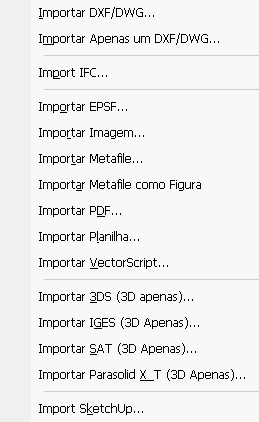
To import a file from another program, go to the File/Import (File/Import) menu and choose one of the options below (figure 1):
figure 1
Import DXF/DWG... (Import DXF/DWG...): Imports several DXF or DWG drawings at once.
Import Single DXF/DWG as Symbol... (Import Single DXF/DWG as Symbol...): Imports only one DXF or DWG drawing at a time.
Import IFC... (Import IFC...): Imports files in the IFC (Industry Foundation Classes) standard, a format used by several programs that adopt the BIM (Building Information Modeling) system.
Import EPSF... (Import EPSF...): A graphic format for programs such as Freehand or Adobe Illustrator.
Import Image File... (Import Image File...): Imports in JPG, BMP, TGA, TIF, and Photoshop formats or web applications.
Import Metafile... (Import Metafile...): Imports drawings in vector format.
Import Metafile as Picture (Import Metafile as Picture): Imports vector drawings as bitmap.
Import PDF... (Import PDF...): Imports one or more files in PDF format.
Import Worksheet... (Import Worksheet...): Imports spreadsheets that can be read by Microsoft Excel.
Import VectorScript... (Import VectorScript...): A programming language format used by Vectorworks.
Import 3DS (3D Only)... [Import 3DS (3D Only)...]: Imports files created in 3D Studio Max.
Import IGES (3D Only)... [Import IGES (3D Only)...]: Imports drawings in IGES format, used in several 3D modeling programs.
Import SAT (3D Only)... [Import SAT (3D Only)...]: Imports drawings in ACIS SAT format, used in several 3D modeling programs.
Import Parasolid X_T (3D Only)... [Import Parasolid X_T (3D Only)...]: Imports drawings in Parasolid format, used in some 3D modeling programs.
Import SketchUp... (Import SketchUp...): Imports drawings from Google SketchUp.
NOTE The IFC, PDF, 3DS, and SketchUp import options do not exist in the AEC configuration in Portuguese, nor in the Fundamentals configuration in English, but they exist in all the others.
Export options
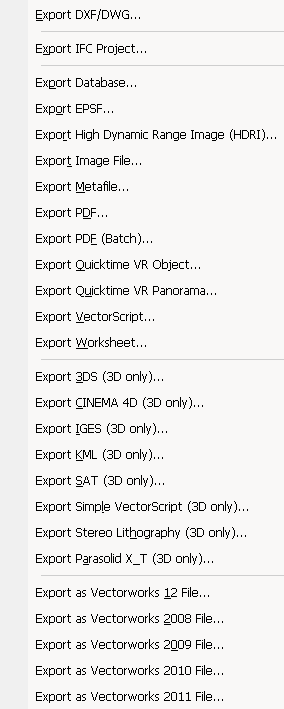
To export a file to another program, go to the File/Export (File/Export) menu and choose one of the options below (figure 2):
figure 2
Export DXF/DWG... (Export DXF/DWG...): Exports drawings to CAD programs, such as AutoCAD.
Export IFC Project... (Export IFC Project): Exports the model in IFC format, which can be opened by several programs that use BIM (Building Information Modeling) technology.
Export Database... (Export Database...): Exports records from the file's databases.
Export EPSF... (Export EPSF...): A graphic format for programs such as Freehand or Adobe Illustrator.
Export High Dynamic Range Image (HDRI)... [Export High Dynamic Range Image (HDRI)...]: Exports the current view in HDRI format.
Export Image File... (Export Image File...): Exports in JPG, BMP, TGA, TIF, Photoshop formats, or web applications.
Export Metafile... (Export Metafile...): Exports the current view in WMF format.
Export PDF... (Export PDF...): Exports the current view, or a sheet layer, in PDF format.
Export PDF (Batch)... [Export PDF (Batch)...]: Exports more than one sheet layer to PDF at once.
Export Quicktime VR Object... (Export Quicktime VR Object...): Exports in VR Object format, for viewing on websites.
Export Quicktime VR Panorama... (Export Quicktime VR Panorama...): Exports in VR Panorama format, for viewing on websites.
Export VectorScript... (Export VectorScript...): A programming language format used by Vectorworks.
Export Worksheet... (Export Worksheet...): Exports spreadsheets that can be read by Microsoft Excel.
Export 3DS...: Exports your model to 3D Studio Max.
Export to CINEMA 4D (3D Only)... [Export Cinema 4D (3D Only)...]: Exports drawings to Cinema 4D software.
Export IGES (3D Only)... [Export IGES (3D Only)...]: Exports drawings in IGES, used in several 3D modeling programs.
Export KML... (Exportar KML...): Exports drawings in KML format, which can be opened in programs such as Google Earth.
Export SAT (3D Only)... [Export SAT (3D Only)...]: Exports drawings in ACIS SAT format, used in several 3D modeling programs.
Export Simple VectorScript (3D Only)... [Export Simple VectorScript (3D Only)...]: Used to bring a Vectorworks drawing into programs such as Strata Studio Pro.
Export to Stereo Lithography (3D Only)... [Export Stereo Lithography (3D Only)...]: Exports in .stl format, used by extrusion machines.
Export Parasolid X_T (3D Only)... [Export Parasolid X_T (3D Only)...]: Exports in .x_t format, developed by Siemens and used by several 3D programs.
Export as Vectorworks 12 File... (Export as Vectorworks 12 File...).
Export as Vectorworks 2008 File... (Export as Vectorworks 2008 File...).
Export as Vectorworks 2009 File... (Export as Vectorworks 2009 File...).
Export as Vectorworks 2010 File... (Export as Vectorworks 2010 File...).
Export as Vectorworks 2011 File... (Export as Vectorworks 2011 File...).
Export as Vectorworks 2012 File... (Export as Vectorworks 2012 File...).
Export as Vectorworks 2013 File... (Export as Vectorworks 2013 File...).
Export as Vectorworks 2014 File... (Export as Vectorworks 2014 File...).
Did you like this post about import and export? Leave a comment!
It was based on the topic Interaction between Vectorworks and other programs, Import and export options, which is part of the book Vectorworks step by step, available in print or as an e-book.
For more information or to purchase the book, visit the website www.probooks.com.br
Here you can learn more about the in-person or online (live) Vectorworks course offered by EBBIM
Would you like to deepen your knowledge of interoperability and information in BIM models? Explore EBBIM’s Curso IFC – dos fundamentos à gestão de projetos e obras. The training covers IFC import and export, properties, classification and data extraction for projects and construction, complementing the topic of this post.




















