How to configure the project's real location

Sunlight, wind direction, local temperature, and other benefits
It's important to specify the geographic location of the project, or its real-world location, in order to run solar insolation studies and ensure the model is correctly interpreted by energy performance analysis tools. Here's a step-by-step guide taken from the Revit passo a passo - volume I book:
Go to the Manage tab; in the Position panel, click the Location button.
figure 01 - manage-location menu
In the Location window (figure 02), choose how you want to define the project's location:
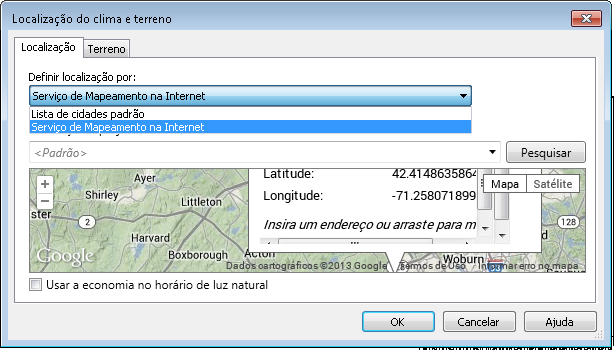
figure 02 - weather and site location
Default City List: Choose a city from the list or type in the latitude and longitude values;
Internet Mapping Service: This feature requires internet access. Type in the address or drag the pin on the map to the desired location.
Click OK.
Did you like our tip? We also have content here that you should find interesting about exploded 3D view...
Would you like to deepen your knowledge of project modeling and documentation in Revit? Explore EBBIM’s Curso Revit. The training covers building elements, families, sites, materials, quantities and drawing sheets, complementing the topic of this post.




















