BIM Interoperability: SketchUp and Revit integration
Originally published in 2017. References to events, registration, prices and professional profiles in this part of the post belong to that period. TI Lab became EBBIM, Empresa Brasileira de BIM, in 2020. Its current website is www.ebbim.com.br.
The purpose of this post is to list the different methods of exchanging data to support SketchUp and Revit integration. For the tests, SketchUp Pro 2017 and Revit 2017 were used.
Integration between software has become increasingly important in the daily routine of those who work with projects, especially with the growing demand for BIM deliverables. Being able to combine the benefits and characteristics of each platform can bring more quality and productivity gains to multidisciplinary projects.
These are the possible ways to achieve SketchUp and Revit integration:
- By direct data reading through import and export commands that may exist within one or both programs. This applies only to importing SketchUp Pro files into Revit, not the other way around.
- By using model export plug-ins. In this method, we found two plug-ins for Revit capable of exporting Revit models to SketchUp. These are rvt2skp and the SimLab SketchUp Exporter. No plug-ins were found that export SketchUp Pro models to Revit.
- Through import and export using file formats that serve as an intermediary between SketchUp Pro and Revit. In this case, it is possible to import or export a SketchUp Pro model to Revit using the .DWG or .IFC formats.
- Lastly, there is a dynamic way of exchanging information between these programs (and others), through a platform called Flux.io. In this case, what is transmitted between .SKP and .RVT files is data related to the geometric construction of elements (among other attributes). So, if you change the geometry of a floor in one of them, for example, the same floor in the other software would undergo the same change.
The table below offers a concise way to understand the exchange methods between SketchUp and Revit:
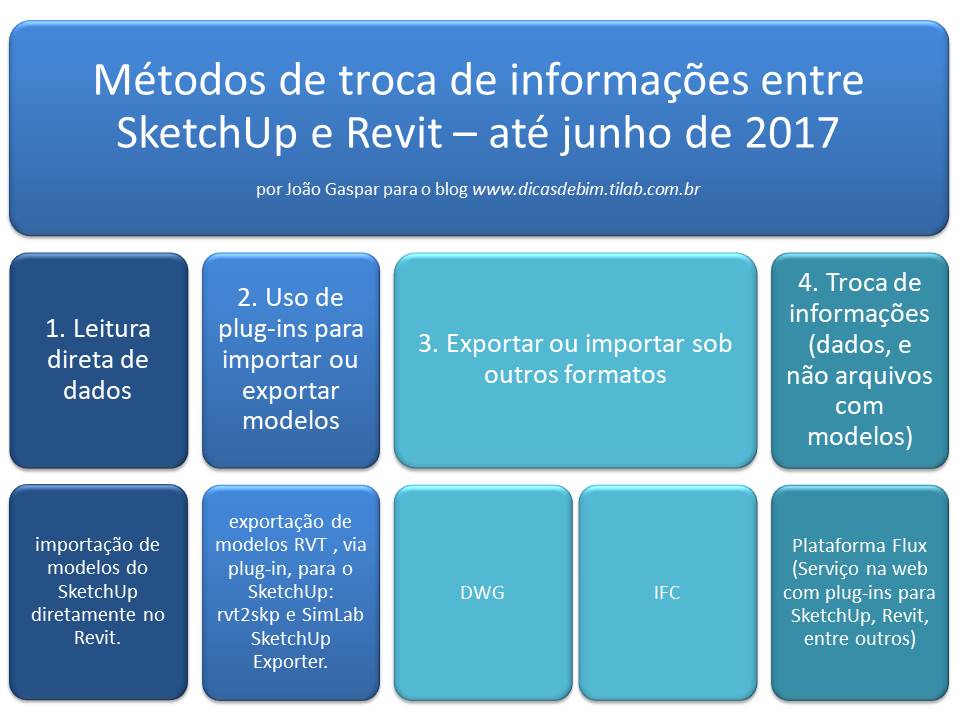
Looking at the table, you can see, for example, that for the procedure of exporting a Revit model to SketchUp Pro you can use:
- DWG export;
- IFC export;
- use of the rvt2skp plug-in or the SimLab plug-in;
- it is also possible to have only the data from a Revit model change SketchUp objects, via Flux.
For other workflows, such as importing a SketchUp file into Revit, there is also more than one procedure to follow.
So, at this point, the question is to show how these procedures work and what the results are once each one is completed, right?
Exactly.
Check out the webinar Interoperability between SketchUp Pro and Revit
To demonstrate how the SketchUp and Revit integration works, the architect and director of EBBIM/ProBooks, at the invitation of totalCAD, presented, on June 30, 2017, the free webinar "Interoperability between SketchUp Pro and Revit", the first in a series held in partnership between the two companies.
Check out the full playlist below:
Watch BIM interoperability: SketchUp and Revit integration on YouTube
Learn more about SketchUp with the SketchUp Pro for BIM course from EBBIM:
https://www.probooks.com.br/produto/curso-sketchup-pro-bim/
Would you like to deepen your knowledge of using SketchUp in BIM workflows? Explore EBBIM’s Curso SketchUp Pro para BIM. The training covers model structure, component properties, IFC exchange and LayOut documentation, complementing the topic of this post.
The Flux link leads to a February 24, 2018 copy preserved by the Internet Archive. It documents the service at that time; interactive features, login and downloads in the copy may not work.




















