Layers Panel - A More Complete Layers Panel

The Layers Panel, developed by French designer Thomas Hauchecorne, can be used in place of SketchUp's default Layers (Layers) panel, since it's more complete; with it, you can separate layers into groups that can be hidden, locked, and other operations that take less time than they would with the traditional panel. It's also linked to the render plugins installed in SketchUp, allowing you to disable layer visibility during the rendering process.
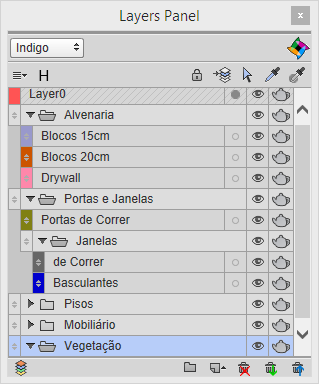
The plugin is free through the SketchUcation community and can be downloaded at http://sketchucation.com/plugin/751-layers_panel.
Bibliographic reference:
GASPAR, João. SketchUp Pro Avançado. São Paulo: ProBooks, 2015
Would you like to deepen your knowledge of modeling and organizing projects in SketchUp? Explore EBBIM’s Curso SketchUp Pro do Básico ao Avançado. The training covers modeling sites and buildings, components, materials and scenes, complementing the topic of this post.




















