How to Import a DXF (CAD) Drawing in Free SketchUp 8!
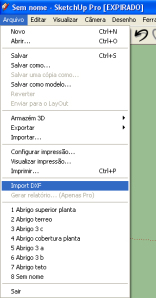
SketchUp 8 came with an unpleasant surprise for anyone who uses files based on CAD drawing software (.dwg/.dxf): the new free version of the program no longer imports files with these extensions.
While there's no solution yet for DWG files, a good workaround is the DXFin Importer plugin: a plugin released for SketchUp that allows importing DXF files, which already helps anyone who needs to open these files.
The plugin was created by the user Honoluludesktop and posted on the SketchUcation forum.
To download the .DXFin plugin and learn more, click here.

Would you like to deepen your knowledge of modeling and organizing projects in SketchUp? Explore EBBIM’s Curso SketchUp Pro do Básico ao Avançado. The training covers modeling sites and buildings, components, materials and scenes, complementing the topic of this post.
Historical references: the recovered links lead to copies of the original pages preserved by the Internet Archive. These pages may not open completely: images, downloads, videos, forms and other features may be missing or may not work. We retain these references as a record of the publication period.
- DXF_in — importador DXF para SketchUp 8 — 03/07/2024




















