Speed Up Your Work by Creating Your Own SketchUp Shortcuts! Or Download Ours for Free!
The shortcut file mentioned in this post is no longer available for download. We have kept the post and shortcut list as a historical record of how SketchUp was used at the time of publication.
One of the simplest ways to speed up your work in SketchUp is to use shortcuts while modeling. Besides considerably increasing the speed of your drawing, it can also save that precious bit of screen space (even more precious when working on notebooks and netbooks, which tend to have smaller screens than desktops).
SketchUp already comes with shortcuts for its main tools. Click here to see the list.
But besides using the shortcuts that already come with SketchUp, you can create your own shortcuts and export them to save somewhere (a pen drive, for example) and import them on any computer.
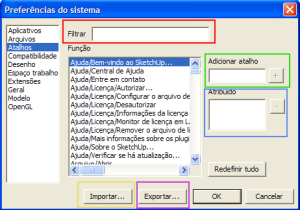
To do this, go to the Janela/Preferências menu (Window/Preferences).
To create shortcuts, you need to search for the command you want to create a shortcut for, typing its name in Filtrar (Filter); once you find the desired command, select it in the main window and type the shortcut key(s) that will be assigned to the command in Adicionar atalho (Add shortcut); click (+) to confirm it so it appears under Atribuído (Assigned). You can remove it by clicking ( -).
I don't recommend changing SketchUp's default shortcuts, but rather creating new ones for commands that don't have a predetermined shortcut.
To export your created shortcuts, click Exportar (Export) and choose a location to save a file with your shortcuts, which will have the .dat extension.
To use a shortcut list that has been saved, click Importar (Import) and look for the .dat file that contains the saved shortcuts. Done! You have new shortcuts!
The originally cited download is no longer available; see the historical note:
Desassociar (Explode): X
Ocultar resto do modelo (Hide rest of model): Alt+H
Criar Grupo: Ctrl+G
Dimensão (Dimension): D
Texto (Text): Alt+T
Excluir Guias: Ctrl+Alt+G
Siga-me (Follow me): Ctrl+F
Plano de Seção (Section Plan): K
Colar no Local (Paste in Place): Ctrl+Alt +V
Camera Anterior (Previous): Alt+Left Arrow
Camera Próximo (Next): Alt+Right Arrow
Camera Projeção paralela: Shift+C
Camera - Alto (Top): Shift+T
Frente (Front): Shift+F
Esquerda (Left): Shift+E
Direita (Right): Shift+D
Posterior (Back): Shift+P
Componentes: Alt+C
Camadas (Layers): Alt+L
Cenas (Scenes): Alt+N
Estilos (Styles): Alt+E
Sombras (Shadows): Alt+S
Estrutura (Outliner): Alt + O
Informações da Entidade (Entity Info): Alt + I
Enjoy and turbocharge your SketchUp!
Would you like to deepen your knowledge of modeling and organizing projects in SketchUp? Explore EBBIM’s Curso SketchUp Pro do Básico ao Avançado. The training covers modeling sites and buildings, components, materials and scenes, complementing the topic of this post.




















